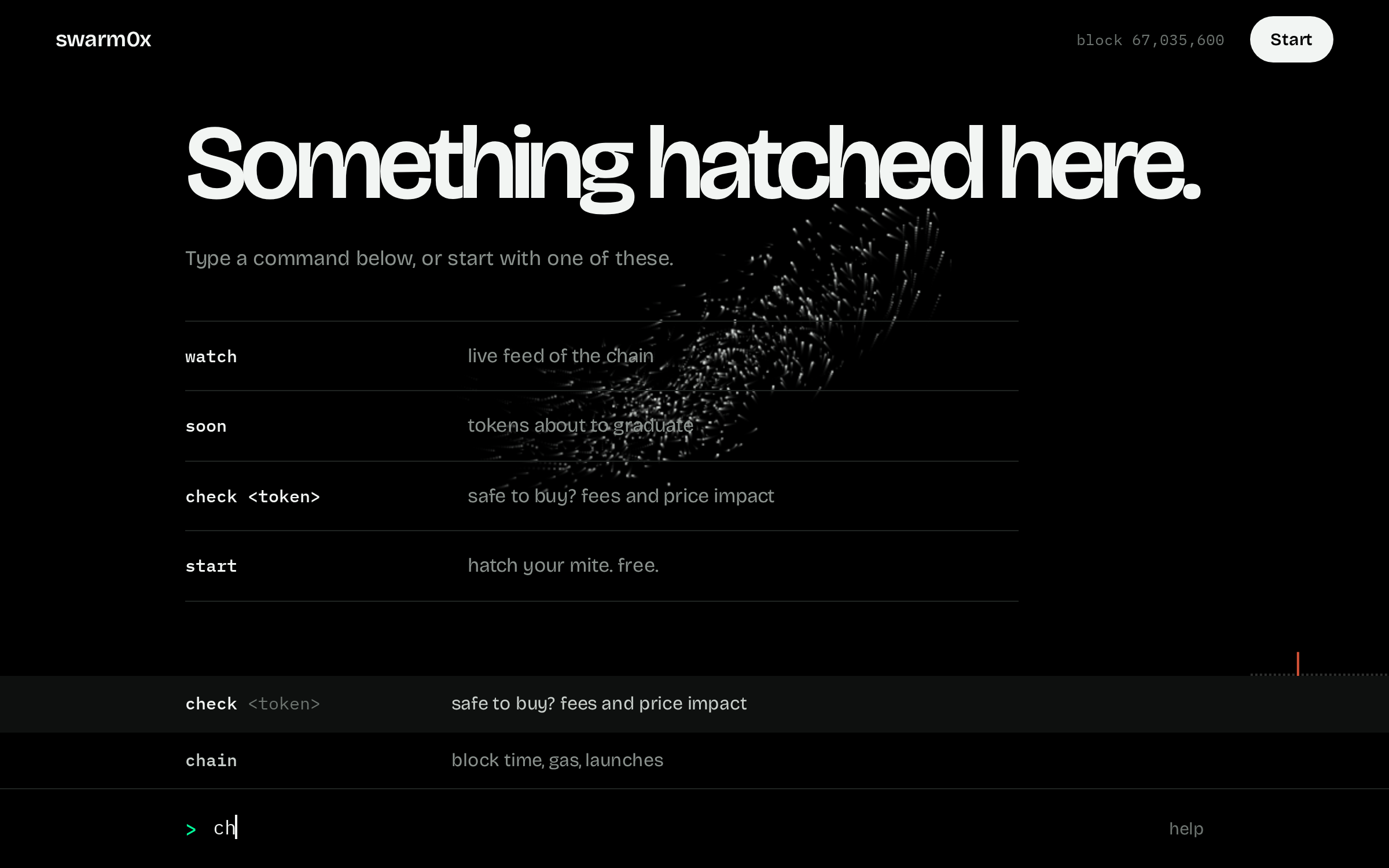
You type a word, press enter, and read the answer. This page covers all 29 commands. You do not have to memorise any of it. Start typing in the console and it suggests the rest.
The basics
The console is one bar at the bottom of the screen. That is the whole interface.
Open app.swarm0x.sh and start typing. Suggestions show up above the bar. Press tab or tap one to pick it.
You can type what you want instead of a command name. Type alert and it offers the commands that send alerts.
Most commands work straight away. The ones marked Needs a mite want you to sign in first. Type start. It is free and it takes one signature.
Click any address in a result and it drops into the bar, ready to use with the next command.
Live feeds keep running until you press Stop.
Type two letters and the console suggests the rest.The answer comes first, in large type. The detail sits under it.
Start here
Three commands get you going.
start[appetite]
No sign in neededAlso answers to hatch
Makes your mite. That is your account here. It is free, you get one per wallet, and it is yours for good. Your wallet asks you to sign one line of text. Nothing is sent, spent or approved.
Type
You get
hatched. MITE-7BEF, #4 of the first thousand.
your mite is a weevil. it eats rug patterns, drainers, honeypot code.
If your browser has more than one wallet, the console lists them and you pick one. It never grabs a wallet on its own.
No wallet in this browser? Open app.swarm0x.sh inside your wallet's own browser.
The appetite decides what your mite looks for first. Leave it out and one is picked for you. You can change it later with appetite.
watch[stocks]
No sign in neededAlso answers to forage
A live feed of the chain. You see new tokens, buys and sells of 0.1 ETH and up, tokens graduating, big transfers, and deployers moving their own supply.
Type
You get
09:39:57  launch    robottery    0x59b4…cd89  by 0x1f65…bd52 tax 3.0%
09:39:57  buy       robottery    0.1250 eth $330  0xe33e…2948 curve 3%
09:40:03  sell      ants         0.3697 eth $976  0x7784…169e curve 26%
Press Stop, or type stop, to end it.
Without a mite it runs for 90 seconds. With one it runs until you stop it.
watch stocks shows only Robinhood stock tokens. Add an appetite, like watch weevil, to see only what that appetite looks for.
Amber rows are alerts. Rust coloured rows are threats, like a deployer selling.
help[topic]
No sign in needed
Shows the six commands most people need. Add a topic or a command name for more.
Type
Topics are buy, hold, alerts and nest.
You rarely need it. Start typing in the console and it suggests commands as you go. You can even type what you want, like alert, and it finds the command that does it.
Before you buy
Run these on a token before you put money in.
check<token>
No sign in neededAlso answers to taste
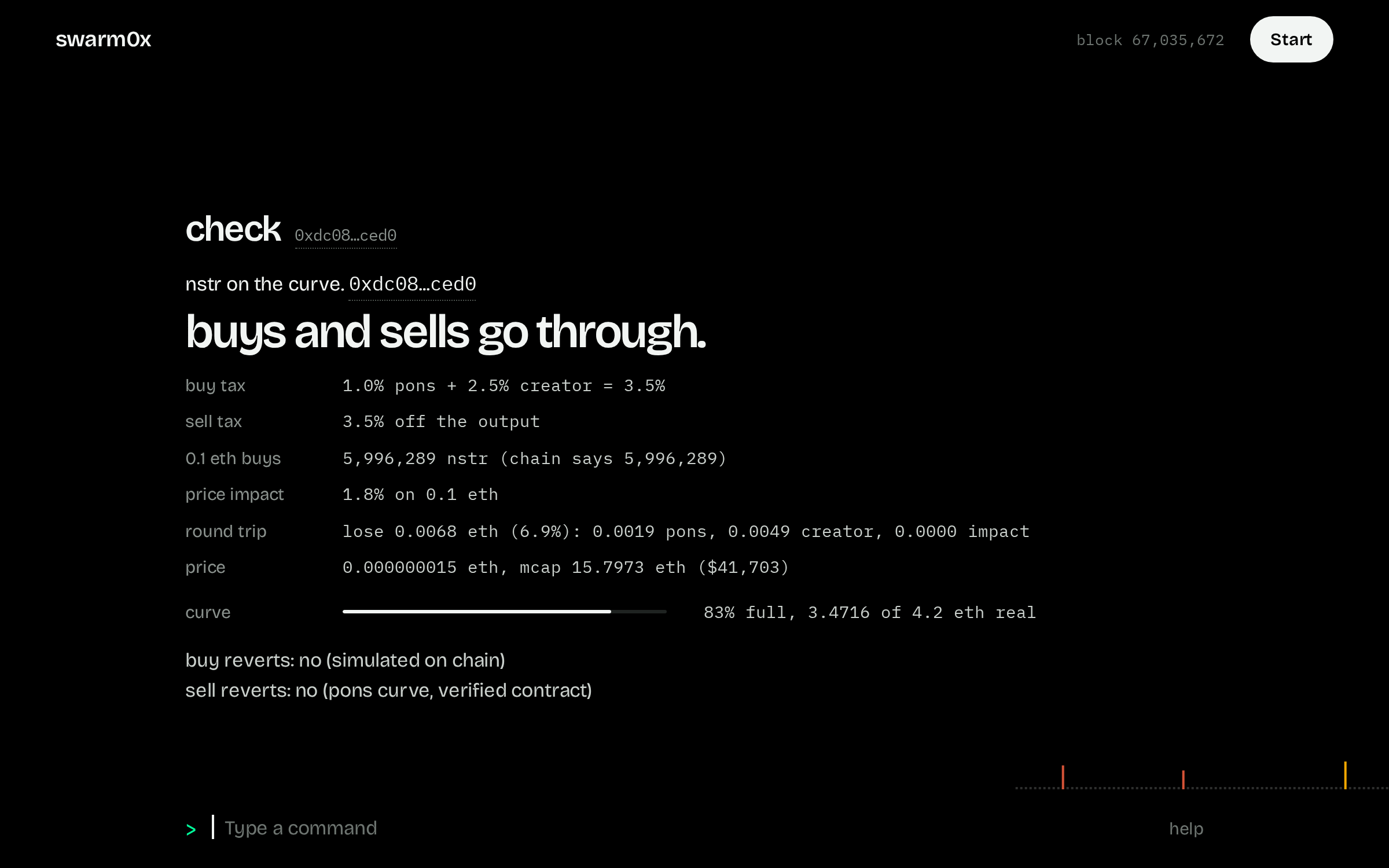
The one to run before you buy. It pretends to buy 0.1 ETH of the token and sell it straight back, on the real chain, without spending anything. Then it tells you if both trades go through and what they would cost you.
Type
You get
nstr on the curve.
buys and sells go through.
buy tax        1.0% pons + 2.5% creator = 3.5%
sell tax       3.5% off the output
0.1 eth buys   5,996,289 nstr
price impact   1.8% on 0.1 eth
round trip     lose 0.0068 eth (6.9%)
curve          83% full, 3.47 of 4.2 eth real
The big first line is the answer. If it says cannot be sold. in rust, walk away.
Round trip is what you would lose buying and selling right away. It is the fees plus the price you move.
It works on tokens launched on Pons. For anything else it tells you so instead of guessing.
scan<token>
No sign in neededAlso answers to dissect
Everything the nest knows about a token on one screen. Where it is in its life, the price, the taxes, who launched it and how that wallet's earlier tokens ended.
Type
You get
rnode  Rentnode
phase           on the curve, 69% full
price           0.000000012 eth, mcap 12.4065 eth ($32,752)
creator tax     3.0% (+ 1.0% pons on every trade)
liquidity       2.8854 eth real on the curve, graduates at 4.2
deployer        0x2fce…8290
deployer: first launch the nest has seen from this wallet.
Click the deployer's address, then type history in front of it to dig into that wallet.
A creator tax near 10% is the most Pons allows. Treat it as a warning.
soon
No sign in neededAlso answers to pupa
Tokens closest to graduating from the Pons curve to a real trading pool, fullest first.
Type
You get
token       fill   real eth   buys 10m   deployer   age
nstr         83%      3.471        0/0   #1         ?
rhd          79%      3.321        9/6   #1         ?
wildebeest   59%      2.482      87/14   #30        72m
Fill is how much real ETH the curve has raised out of the 4.2 it needs.
Buys 10m is buys and distinct wallets in the last ten minutes. 87/14 means 87 buys from 14 wallets.
Deployer #30 means this is that wallet's thirtieth launch. Serial launchers are worth a second look.
Click any address in the table to reuse it, for example after typing check.
history<wallet>
No sign in neededAlso answers to lineage
Where a wallet's money came from and what it launched before. Good for judging a deployer before the curve fills.
Type
You get
deployed 1 tokens: 0 graduated, 0 drained, 0 dead.
token   state   age   address
rnode   curve   ?     0x954f…f8b4
coverage: the nest has watched since block 66884588.
The nest only reports what it has seen. If a wallet is older than the nest, it says so instead of making things up.
As your mite grows it follows the money further back.
bundle<token>
Needs a miteWill need $SWARM after launchAlso answers to clutch
Shows who bought in the launch block and the 30 blocks after it, grouped by who paid for those wallets. One funder behind many wallets is a bundle, and it means fewer real hands than it looks.
Type
You get each funder, how many wallets it paid for, and the share of supply they hold together.
While you hold
Keep an eye on what you own and the wallets that matter.
bag
Needs a miteAlso answers to gut
What your wallet holds, what you paid, and whether you are up or down. It also warns you when something changed since you bought, like the deployer selling or liquidity moving.
Type
You get
nothing in your bag that the nest has seen you buy.
Balances come straight from the chain. Your cost comes from trades the nest saw, so buys from before it was watching are not counted.
follow<wallet> [as name]
Needs a miteAlso answers to trail
Follow any wallet and hear when it moves. Give it a name so you read whale3 bought instead of a string of hex.
Type
You get
following deployer1. 0x2fce…8290
nothing from it since the nest started watching. you will know when it moves.
follow on its own lists the wallets you follow and streams them live.
A new mite can follow 3 wallets. The number grows as your mite does.
To be told while you are away, add a rule and a notify channel. See below.
linked<wallet>
Needs a miteWill need $SWARM after launchAlso answers to colony
Finds wallets that move together with this one. They share a funder, or they bought the same tokens within 5 blocks of it three times or more.
Type
Useful for seeing how many people are really behind a token.
signals
No sign in neededAlso answers to twitch
What looked odd on the chain in the last hour. Deployers selling, wallets quietly piling in, taxes set near the cap, sudden volume.
Type
You get
11:03:04  weevil  lizard: creator tax 10.0% at launch. near the 10% cap.
11:03:00  weevil  onlyb: deployer sold 0.0480 eth (2.83% of supply).
11:04:18  tick    lizard: 0x9a06…11fa bought 14x in an hour, sold 0, holds 7.7% of supply.
If you have a mite, what your appetite looks for comes first.
It shows 30 rows at most.
flag<token> runs|drains|dead
Needs a miteAlso answers to mark
Put your call on the record. Say a token will run, drain or die, and the chain scores you six hours later. Being right grows your mite. Being wrong shrinks it.
Type
You get
flagged: rnode runs. first on this token.
price now 0.000000012 eth. the chain answers in 6 hours. 2 credits left.
runs means 1.5 times the price, or it graduates, within 6 hours.
drains means liquidity gets pulled, insiders dump, or the price falls to a fifth.
dead means the price falls to a fifth and trading stops.
Right earns 20 xp, or 40 if you were one of the first five to call it. Wrong costs 25. A new mite gets 3 flags a day.
copy<MITE-ID>
Needs a miteWill need $SWARM after launchAlso answers to scent
See another mite's flags as they make them. Pick mites with a good record.
Type
copy on its own shows who you copy and their latest calls.
While you are away
A console you have to stare at is no use at 3am. Send alerts somewhere you will see them.
notify
Needs a miteAlso answers to antenna
Choose where alerts go. Discord and your own webhook work today. Telegram comes once the bot is switched on.
Type
For Discord, make a webhook in your channel settings and paste its address.
A webhook gets a JSON post for every alert, signed with a secret you are shown once.
notify on its own lists your channels. notify off and a number removes one.
One channel is free. A second one will need $SWARM after launch.
rule<rule>
Needs a miteAlso answers to snare
A standing alert. Write it once and the nest keeps watching for you.
Type
You get
rule #3 set: follow buying over 1 eth
no notify channel yet. hits will only show in rules until you set one.
rule test replays the last 7 days so you can see how noisy a rule is before you keep it.
rules lists yours with how often each one fired. unrule and a number deletes one.
A new mite can keep 2 rules. See how to write one below.
dailyHH:MM
Needs a miteWill need $SWARM after launchAlso answers to digest
One summary a day, sent to your notify channel. New findings, followed wallets that moved, anything in your bag that changed.
Type
You get
daily at 08:00 utc, every day, to your notify channel.
Times are in UTC.
daily now sends one straight away so you can see what it looks like.
Your mite and the nest
Your account, the shared picture, and the chain itself.
me
Needs a miteAlso answers to mite
Your mite at a glance. Its stage, how accurate your flags have been, and how much room you have left for follows and rules.
Type
You get
MITE-02FF
appetite        weevil
instar          instar 1 (0/100 xp)
credits         3 pheromones left today (3/day at this instar)
following       0/3 wallets
rules           0/2
marks           first-thousand
Instar is your mite's stage, from 1 to 5. It grows when your flags turn out right.
Pheromones are your flags. Credits are how many you have left today.
appetite<name>
Needs a mite
Changes what your mite looks for first. You can switch once a week.
Type
You get
MITE-02FF is now a locust. it eats volume and price that breaks from its own average.
borer looks for new launches and first liquidity.
tick looks for wallets that build a position quietly.
weevil looks for rugs, drainers and honeypots.
locust looks for volume and price that break from normal.
status
No sign in neededAlso answers to nest
The shared picture. How many mites there are, what the nest is busy with, and how far behind the chain it is.
Type
You get
mites           8 (8 fed today, 0 starving)
brood           not yet begun
last hour       367 launches, 31537 things seen
head            block 67031642, 2 behind
chewing on:
  rhd          50 twitches  0xedb0…dcd5
Chewing on lists the tokens with the most signals in the last hour.
This is also where the $SWARM contract address will appear on launch day.
chain
No sign in neededAlso answers to hum
How the chain is doing right now.
Type
You get
block              66940555, 100ms per block
gas                0.066 gwei
eth                $2,654
launches           507 in the last hour
graduations        14 in the last day
trades             328.6 per minute
idle
No sign in neededAlso answers to starve
Mites that are being neglected, yours included. A mite left alone for 14 days drops a stage.
Type
Nothing is lost for good. Use the console again and it climbs back.
grow[txhash]
Needs a miteAfter launchAlso answers to molt
Pay to move your mite up a stage instead of earning it. It burns $SWARM.
Type
grow on its own shows the cost and the burn address. Send the tokens there, then type grow and the transaction hash.
It works up to stage 4. The last stage can only be earned.
Until the token launches this just tells you there is nothing to burn yet.
merge<MITE-ID> [txhash]
Needs a miteAfter launchAlso answers to graft
Fuses two mites into one that has both appetites. It burns $SWARM, and the second mite is gone for good.
Type
The owner of the other mite types merge consent with your ID first, so nobody can be merged against their will.
card<token>
No sign in neededAlso answers to plate
Makes a shareable image of a token's scan, ready to post. It carries the ID of the mite that made it.
Type
You get
specimen plate for rnode
open the plate
The app itself
Small things that make the console nicer to use.
wallet
No sign in needed
Shows which wallet you are signed in with. From here you can switch to a different wallet or add Robinhood Chain to any wallet you have.
Type
One mite per wallet. If you switch wallets you get a different mite. The first one stays with its wallet.
Signing in works on any network. Adding Robinhood Chain is there for convenience.
leave
No sign in needed
Signs you out of this browser. Your mite stays where it is.
Type
stop
No sign in needed
Ends a live feed. The Stop button and Ctrl C do the same.
Type
clear
No sign in needed
Clears the screen. Ctrl L does the same.
Type
Nothing matches that. Try a shorter word.
Writing a rule
A rule is one short line. Say who you care about, what they do, and if you like, how big it has to be.
Part
What you can write
who
follow for any wallet you follow, any for anyone, a wallet address, deployer: and a token address, or creator: and a token address
over 1 eth, over 5000 usd or over 10%. Leave it out to catch everything.
which token
on and a token address. Leave it out for any token.
A few that are useful
Run rule test first. A rule like any launching fires hundreds of times a day, and you will want to narrow it.
Rules only reach you while you are away if you have set up notify.
Reading a result
the big line
Some commands open with the answer in large type, like buys and sells go through. Read that first.
amber
Worth a look. An alert, a big transfer, a token close to graduating.
rust
A threat. A deployer selling, liquidity leaving, a token that cannot be sold.
the thin bar
A share of something. On a token it shows how full the curve is.
0x7eD5…EC7e
A shortened address. Hover to see all of it. Click to drop it into the bar.
the moving line
The strip above the bar is the chain's pulse. Each bar is a slice of time. Taller means more ETH traded in it.
Limits and stages
Your mite has a stage, from 1 to 5. It moves up when your flags turn out right and slips back if you leave it alone for two weeks. A higher stage gives you more room.
Stage
Wallets you can follow
Rules
Flags a day
1
3
2
3
2
6
4
5
3
12
8
8
4
25
16
12
5
50
32
20
Everything is open today because $SWARM has not launched. After launch, the commands marked in amber will need you to hold some. Hatching a mite and the safety commands, like check, scan and history, stay free. The token page has the detail.
Words you will see
The console still uses a few of its own words in its answers. Here is what they mean.
mite
Your account. One per wallet.
nest
The shared pool of everything all the mites have found.
appetite
What your mite looks for first. Borer, tick, weevil or locust.
instar
Your mite's stage, 1 to 5. The last one is called imago and can only be earned.
pheromone
A flag. Your call that a token will run, drain or die.
twitch
A signal. Something on the chain that did not fit the usual pattern.
brood
A season. Stages reset each season and your marks stay.
curve
How a new Pons token is sold at first. The price rises as people buy.
graduate
When a curve has raised 4.2 ETH the token moves to a normal trading pool with locked liquidity.
deployer
The wallet that launched a token.
creator tax
A cut of every trade that goes to the token's creator. Pons caps it at 10%.
There are more commands than this page lists. The first wallet to find one gets its name in the field notes.